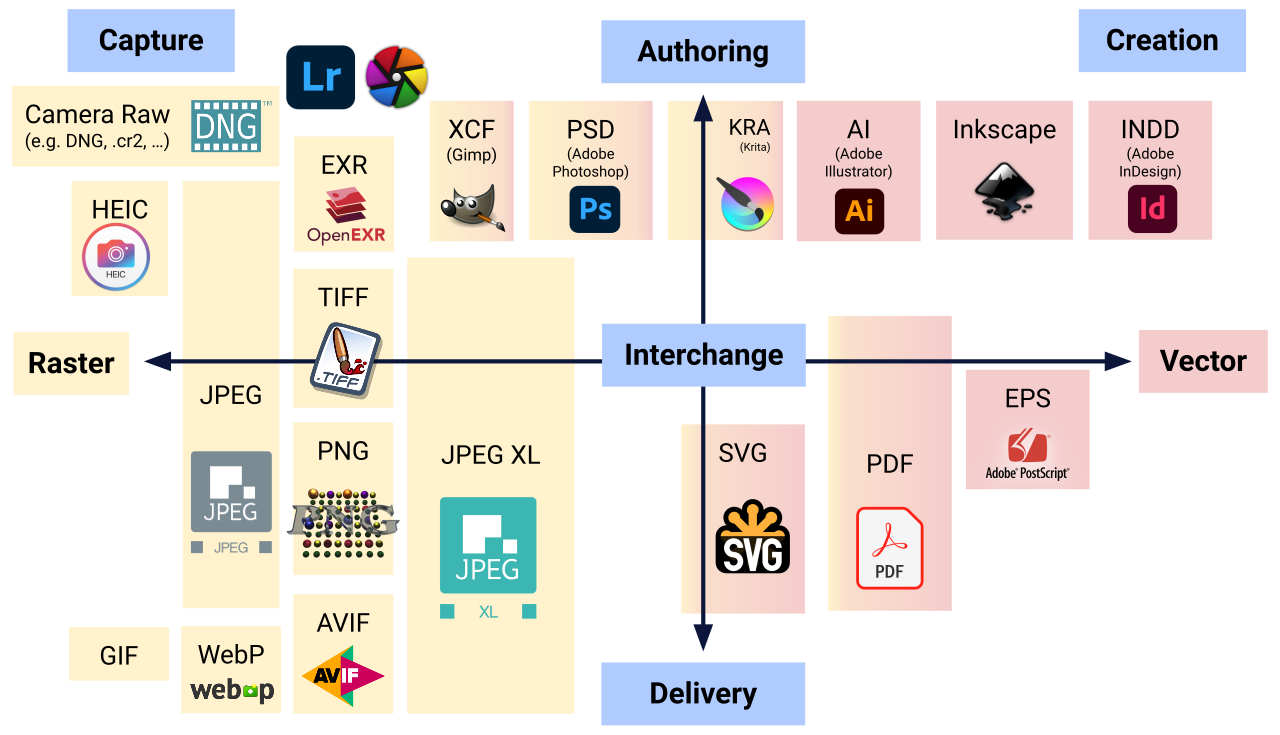
Choosing an image format becomes difficult as soon as several constraints meet: photography, transparency, screenshots, logos, animation, compatibility, file size, and visual quality. The question “which format is best?” is therefore misleading.
There is no universally best image format. There is a format that is better suited to a particular type of content and delivery workflow.
JPEG remains highly effective for many opaque photographs. PNG is valuable for lossless graphics and transparency. WebP combines lossy, lossless, and transparent workflows with broad modern-browser support. AVIF can achieve excellent compression, especially for photographic content, but should be evaluated against encoding cost, tooling, and the actual image. For logos and geometric artwork, the right answer may instead be SVG.
The quick choice
For photographs, start by comparing WebP or AVIF with a good JPEG. For screenshots and flat graphics, compare PNG with lossless WebP. For logos and icons, prefer SVG when the artwork is genuinely vector. For transparency, PNG, WebP, AVIF, and SVG can all be relevant depending on content.
Before the format: what is a raster image?
JPEG, PNG, WebP, and AVIF normally store raster imagery: a finite grid of pixels. The format controls how those pixels and related information are encoded. Read How Is a Digital Image Built? if you want the pixel-level foundation.
Format, resolution, and compression are three different decisions
Format answers how the image is encoded. Resolution answers how many pixels it contains. Compression settings answer how aggressively data is reduced. A perfectly chosen format can still be wasteful if you serve a 4,000-pixel file into a 400-pixel slot.
JPEG: why is it still used?
JPEG is mature, universally understood by image software, and extremely effective for photographic content. Its broad compatibility and predictable tooling still make it a useful baseline and fallback in many production systems.
Why does JPEG work well for photographs?
Photographs contain continuous tones, texture, and complex variation. JPEG’s lossy approach can discard information in ways that are often difficult to notice at normal viewing sizes, producing substantial savings.
Why is JPEG poor for some graphics?
Sharp text, flat-color illustrations, diagrams, and interface screenshots can expose blocking, ringing, and edge artifacts. A lossless format or a codec better suited to those structures may preserve them more cleanly.
Does JPEG support transparency?
Classic JPEG does not provide the alpha transparency commonly needed for cut-out graphics. If transparent backgrounds are required, consider PNG, WebP, AVIF, or SVG depending on the asset.
PNG: why is it different?
PNG is designed around lossless raster storage and supports alpha transparency. It is excellent when exact pixels, sharp edges, or transparent areas matter. Its weakness is that photographic images can become much larger than equivalent lossy encodings.
Is PNG always lossless?
The PNG format itself uses lossless compression for its stored image data. However, an image may have been altered, quantized, or reduced before being encoded as PNG. “PNG” therefore does not prove that the current file is identical to some earlier master.
What do PNG-8 and PNG-24 mean?
These labels are common workflow shorthand. PNG-8 usually refers to indexed-color PNG with a limited palette, while PNG-24 commonly refers to truecolor RGB PNG. Alpha capabilities and actual PNG color types are more nuanced than the marketing labels suggest.
Why is PNG excellent for screenshots?
Screenshots often contain repeated flat colors, crisp text, and interface edges. Lossless compression can preserve those structures exactly and often compress them efficiently, particularly when the palette is limited.
PNG and transparency
PNG can store full alpha transparency, allowing smooth partially transparent edges. This makes it useful for cut-out assets, overlays, and graphics that must work on different backgrounds.
WebP: why has it become so common?
WebP supports lossy and lossless compression, transparency, and animation in one family of formats. Modern browser support is broad, and it can often reduce file size compared with older workflows.
Lossy or lossless WebP?
Use lossy WebP when controlled visual loss is acceptable, especially for photographs. Use lossless WebP when exact reconstruction is needed and compare it with PNG because results depend heavily on the content.
Is WebP always smaller than JPEG?
No. Encoder settings, image content, metadata, and quality targets matter. A poorly encoded WebP can be larger than a well-optimized JPEG. Compare at similar visual quality, not merely at identical slider numbers.
Is WebP always better than PNG?
No. Lossless WebP can outperform PNG on many assets, but not every image. PNG also has excellent tooling and can be ideal for specific workflows. Measure representative files before standardizing.
AVIF: why is it so interesting?
AVIF is based on AV1 image coding and can achieve impressive compression, especially on photographic material. It supports modern features including transparency and high-quality encoding options.
Is AVIF always the best format?
No. Some assets compress better elsewhere, and encoding can be slower. Small graphics may gain little. Tooling, decoding context, quality tuning, and operational complexity all belong in the decision.
AVIF and transparency
AVIF can support alpha transparency, which makes it a candidate for some assets traditionally stored as PNG or WebP. Always inspect edge quality and file size on the actual graphic.
Why can AVIF be slower to encode?
More sophisticated compression tools often explore a larger search space to find efficient representations. That can increase build or export time. Slow encoding may be acceptable in an offline pipeline and inconvenient in interactive user workflows.
What about GIF?
GIF remains recognizable for simple animation but is limited in color and is often inefficient compared with modern alternatives. For animation, compare animated WebP, video formats, CSS/SVG animation, or other delivery strategies according to the content.
What about SVG?
SVG is vector markup, not another photographic raster codec. It excels for logos, icons, diagrams, and geometric illustrations. Read SVG: Understanding the Vector Format before rasterizing artwork that could remain vector.
Raster or vector: the first real decision
Before comparing JPEG with WebP, ask whether the source should be raster at all. Photographs are naturally raster. Logos and simple diagrams are often better represented as vectors.
How should you choose for a photograph?
Start with an appropriately resized master. Compare JPEG, WebP, and AVIF at similar perceived quality. Keep the smallest version that preserves the detail the user actually needs.
How should you choose for a screenshot?
PNG is a strong baseline because text and interface edges remain exact. Lossless WebP can also perform well. If the screenshot is photographic or very complex, carefully tuned lossy encoding may be acceptable, but inspect small text.
How should you choose for a logo?
Prefer SVG when the logo is vector and can be safely delivered as SVG. If a raster version is required, PNG or lossless WebP can preserve sharp edges and transparency.
How should you choose for transparency?
Ask what the image contains. A photographic cut-out may work well in WebP or AVIF. A flat graphic may suit PNG or SVG. Transparency is a capability requirement, not enough information to select a format by itself.
How should you choose for an illustration?
Geometric artwork may belong in SVG. Raster illustrations with many textures can be tested in WebP or AVIF. Flat-color raster art can compress very well losslessly.
How should you choose for a thumbnail?
Dimensions usually matter more than codec sophistication. First generate a thumbnail near its real display needs, then compare formats. A tiny correctly sized JPEG can beat an oversized AVIF in practical performance.
Why isn’t format enough for performance?
A modern codec cannot compensate for unnecessary dimensions, excessive quality, missing responsive variants, or poor loading strategy. Format is one layer of Web image optimization.
Why create several formats?
Multiple formats can let modern browsers receive a newer codec while older environments use a fallback. But each extra format increases storage, build time, testing, and cache complexity. Add variants when the measurable benefit justifies the operational cost.
The <picture> element
<picture> can provide alternative sources with MIME types or media conditions, while an <img> remains the fallback and semantic image element. It is useful for format negotiation and art direction when a single srcset is not enough.
Do you still need a JPEG fallback?
It depends on your supported browser matrix and audience. Modern projects may not need legacy fallbacks for every asset, while products with embedded webviews, old software, or strict compatibility requirements may keep them.
How do you compare two formats correctly?
Use the same source and target dimensions. Tune each encoder independently until visual quality is comparable. Then compare file size, encode time, decode behavior where relevant, transparency, metadata, and tooling.
What should you inspect visually?
Look at hair, foliage, gradients, skin, text, sharp edges, high-contrast boundaries, transparent contours, and flat-color areas. Zoom in to diagnose artifacts, then return to the final display size to decide whether they are actually visible.
Do metadata affect file size?
Yes. EXIF, XMP, ICC profiles, thumbnails, and other metadata can add bytes. Their importance varies by file. Do not delete them blindly; decide what the public derivative needs.
Should color profiles be removed?
Not automatically. A color profile can be necessary for predictable color. Removing it to save a few kilobytes can change appearance in some workflows. Optimize with knowledge of the intended color space.
Format and privacy
Image metadata can contain dates, device information, or location data. Changing format may remove, preserve, or transform metadata depending on the tool. Inspect the final public file with the image metadata reader.
Format and accessibility
Format alone does not make an image accessible. Provide meaningful alternative text where required, avoid unnecessary images of text, preserve sufficient contrast, and ensure diagrams communicate information beyond color alone.
Format and SEO
Search engines care about useful content, discoverability, dimensions, loading behavior, and page quality. A modern format can improve performance but is not an SEO shortcut by itself.
Format and Core Web Vitals
Smaller correctly sized images can improve loading metrics, particularly when a hero image is the Largest Contentful Paint element. But loading priority, responsive selection, layout dimensions, and server behavior also matter.
Should you convert every image on a site to WebP?
No. Audit first. Some files may already be efficient, some should remain SVG, and some legacy assets may not justify migration. Automating conversion without visual comparison can create quality regressions.
Should you convert every image to AVIF?
No. AVIF is a powerful option, not a universal mandate. Compare representative assets and account for encoder speed, quality tuning, compatibility, and the complexity of maintaining another derivative.
When should you keep JPEG?
Keep JPEG when it already meets quality and weight goals, when broad software compatibility matters, or when your production pipeline is built around it and a newer format provides little practical gain.
When should you keep PNG?
Keep PNG for lossless raster graphics, screenshots, assets with transparency, or workflows where its exact pixel behavior and tooling are valuable.
When should you choose WebP?
Choose WebP when you want a broadly supported modern format that handles photographs, transparency, and lossless assets efficiently. It is often a pragmatic default candidate.
When should you choose AVIF?
Choose AVIF when tests show meaningful savings at acceptable visual quality and your tooling/support matrix can absorb it. It is especially worth testing on larger photographic assets.
Why shouldn’t you repeatedly re-encode lossy images?
Each lossy generation can discard additional information. Keep a high-quality master and generate delivery derivatives from that source rather than JPEG → WebP → AVIF chains.
Which file should you keep as the source?
Keep the highest-quality trustworthy master available: original photograph, lossless export, or editable vector source. Delivery files are derivatives, not your archive.
How should you organize variants?
Use predictable naming or a build pipeline that records width, format, and perhaps density. Avoid ambiguous files such as image-final-final2.webp. Stable conventions make responsive markup and cache invalidation safer.
Does the format change CSS dimensions?
No. A 1,200 × 800 JPEG and a 1,200 × 800 WebP can occupy the same CSS layout. Format changes encoding; layout is controlled separately.
Can resizing save more than changing format?
Absolutely. Reducing a 4,000-pixel image to the 1,200 pixels actually needed can remove far more data than changing codec alone. Use the image resizer before chasing marginal format gains.
What about Retina DPR?
High-density screens may benefit from larger source candidates, but do not send the maximum density to everyone. Use responsive images so the browser can select an appropriate resource.
A modern strategy in six steps
Keep a master. 2. Determine actual display dimensions. 3. Generate useful widths. 4. Choose one or more suitable formats. 5. Tune quality visually. 6. Deliver responsive candidates and measure the real page.
Workflow with Bethemesh tools
Inspect dimensions and metadata, resize with the image resizer, convert with the image converter, then compare final files. Format selection works best as part of a complete workflow rather than as an isolated conversion.
The most common mistakes
Avoid converting by extension rename, assuming newer always means smaller, comparing identical quality-slider numbers across codecs, keeping camera dimensions for tiny slots, deleting color profiles blindly, and repeatedly re-encoding lossy derivatives.
Comparison table
Format
Best starting use
Lossless
Lossy
Transparency
Vector
JPEG
Photographs, compatibility
No
Yes
No
No
PNG
Screenshots, flat graphics
Yes
No
Yes
No
WebP
General modern raster delivery
Yes
Yes
Yes
No
AVIF
High-efficiency modern raster
Yes/codec-dependent workflow
Yes
Yes
No
SVG
Logos, icons, diagrams
N/A
N/A
Yes
Yes
A decision matrix based on content rather than fashion
When a team standardizes image delivery, it is tempting to choose one modern extension and declare the problem solved. A more durable rule starts from content classes. Photographs, screenshots, logos, diagrams, thumbnails, transparent cut-outs, and editorial illustrations do not create the same encoding problem.
For a photographic library, you might keep a high-quality master and generate WebP plus AVIF candidates, with JPEG retained only where your compatibility policy requires it. For documentation screenshots, lossless WebP or optimized PNG may be the default because text and one-pixel edges matter more than photographic texture. For icons and logos, the pipeline should first ask whether an SVG source exists before producing raster variants.
This content-based policy has another advantage: exceptions remain understandable. If one AVIF hero shows banding at the target size, keeping WebP for that asset is not a failure of the strategy. It is evidence that the strategy is based on measured results rather than format ideology.
Browser support is only one part of compatibility
Modern browser support for WebP and AVIF is broad, but production compatibility can include much more than browsers. Images may pass through content-management systems, social-sharing crawlers, email templates, office software, native applications, PDF generators, or partner APIs.
A website can therefore use a modern format for its own pages while preserving JPEG or PNG exports for downstream systems. Do not let the requirements of an old external workflow force every visitor to receive an older format; equally, do not break an important integration merely because a format works in your current browser.
Document where each derivative is intended to be consumed. A predictable asset pipeline can produce several outputs from one master without turning those outputs into competing “originals.”
Quality comparison should be role-specific
A 100 KB difference matters differently for a 64-pixel avatar and a full-width LCP hero. Likewise, a tiny visual defect matters differently in a decorative background and a screenshot explaining where a user must click.
For critical editorial imagery, preserve facial detail, gradients, and important texture. For documentation, prioritize legible text and sharp UI edges. For thumbnails, first remove unnecessary dimensions, because resolution often dominates the budget. For transparent product imagery, inspect alpha edges over all intended backgrounds.
This is why format benchmarks based on a generic test corpus are useful evidence but not a substitute for testing your own assets. The winning format for your site is the one that performs well on the images your site actually serves.
Migration strategy for an existing site
Do not necessarily convert an entire library in one operation. Start with the pages that transfer the most image data or contain important LCP assets. Generate modern derivatives without deleting the existing masters. Update markup so browsers can select the new resources, then measure transfer size and visual quality in production.
Once the workflow is stable, migrate repeated image classes such as article covers, cards, and thumbnails. Keep naming and cache rules deterministic. If an asset is regenerated, its URL or cache invalidation strategy should make the new version reliably available.
This incremental approach reduces risk and makes the gains visible. It also prevents a large one-off migration from creating thousands of files that nobody has actually validated.
The best default is the one your pipeline can maintain
A format strategy should survive ordinary editorial work. If AVIF saves a little more data but nobody on the team can reliably preview, regenerate, or debug the files, WebP may be the better operational default. Conversely, a fully automated pipeline can make AVIF almost invisible to editors and deliver it only where it provides a measurable benefit.
Evaluate maintenance alongside compression ratio: source ownership, build time, deployment storage, cache invalidation, browser debugging, CMS previews, and the ability to regenerate every derivative. The strongest image strategy is not the one with the newest extension; it is the one that consistently produces correct, lightweight assets without putting the original content at risk.
Choosing formats by content type
Format choice becomes easier when you start from what the image contains rather than from whichever format is currently fashionable. Photographs, flat graphics, transparent illustrations, logos, screenshots, and animated assets have different statistical properties and different requirements. A format that is excellent for one category can be a poor default for another.
Photographs
JPEG remains a practical baseline for photographs because it is universally understood and its lossy compression is well matched to continuous-tone imagery. WebP and AVIF can often produce smaller files at comparable visual quality, but the result depends on the encoder, quality setting, image content, and processing pipeline. Compare actual exports rather than assuming a fixed percentage saving.
Logos, icons, and geometric illustrations
If the artwork is genuinely vector-based, SVG is usually the strongest option because shapes and text-like geometry scale without requiring several raster resolutions. It can also be styled or manipulated when embedded appropriately. SVG is not automatically small, however: editor metadata, excessive path precision, embedded raster images, and complex filters can make it heavy. Optimize and review it like any other production asset.
Screenshots and UI graphics
Screenshots contain sharp edges, text, repeated flat colors, and sometimes photographic regions. PNG preserves those edges exactly but can be large. WebP lossless or carefully tuned lossy WebP may reduce size significantly. AVIF can also work, but fine text and thin lines deserve close inspection because aggressive lossy settings can introduce ringing or blur that is more noticeable than on a photograph.
Transparency
PNG, WebP, AVIF, and SVG can all support transparency in appropriate forms; traditional JPEG cannot. Transparency alone therefore does not decide the format. Ask what kind of image it is, whether exact edges matter, whether it is vector or raster, and how broad your compatibility requirements are.
Animation
Animated GIF is widely recognized but inefficient for many modern use cases. Animated WebP and AVIF can be more efficient where supported, while video formats are often substantially better for longer or photographic motion. The correct choice depends on whether the asset is truly an image-like loop or should be treated as video content with playback controls and media semantics.
Format, dimensions, and compression are separate decisions
Changing JPEG to WebP does not fix an image that is several times larger than its display size. Likewise, resizing an image does not automatically select a good compression level. A robust workflow handles these dimensions separately: choose the required pixel dimensions, choose a format that matches the content and compatibility target, then tune compression while checking the rendered result.
Responsive delivery adds another layer. Instead of producing one huge modern-format file, create a small set of appropriately sized variants and let the browser choose among them with srcset and sizes. The best format cannot compensate for sending unnecessary pixels.
Metadata and privacy
Format conversion may keep, transform, or remove metadata depending on the tool. Do not assume that converting to WebP or AVIF automatically strips EXIF, GPS, copyright, or editor-specific information. Inspect the exported file when metadata matters for privacy or attribution. Keep an archival master if you need the original metadata even when the public derivative should be clean.
Browser compatibility and fallbacks
Compatibility is broader than whether a browser can decode a format. Email clients, CMS pipelines, social platforms, image-processing libraries, feeds, PDF generators, and external APIs may all impose constraints. If your environment needs a fallback, HTML <picture> can provide modern sources while retaining a broadly compatible image. The maintenance cost of multiple formats should be part of the decision.
A migration strategy for an existing site
Do not convert an entire media library blindly. Start with the heaviest and most frequently viewed pages, identify the largest image opportunities, generate modern alternatives, and measure the impact. Preserve originals, automate repeatable settings, and keep visual regression checks for critical assets. A smaller number of well-maintained rules is better than a complex matrix nobody can reproduce six months later.
Practical decision rule
Use SVG for true vector artwork; consider JPEG, WebP, or AVIF for photographs; consider PNG or lossless WebP for graphics that need exact raster detail; and evaluate modern formats with real encodes rather than reputation. Then resize correctly, compress deliberately, strip only the metadata you intend to remove, and deliver responsive variants where layout width changes.
Additional format questions
Is WebP always smaller than JPEG?
No. WebP often wins on many photographic images, but a carefully optimized JPEG can occasionally be smaller at the visual quality you require. Encoder versions and settings matter. Compare files generated from the same master at equivalent visible quality.
Is AVIF always smaller than WebP?
No. AVIF can be remarkably efficient, especially on some photographic content, but it may encode more slowly and may not win on every small graphic. At tiny dimensions, container overhead and the character of the image can outweigh theoretical codec efficiency. Test representative images from your own site.
Should a logo be PNG or SVG?
If the logo is genuinely vector artwork and does not depend on raster effects that translate poorly, SVG is usually preferable because it scales cleanly and can remain compact. PNG is useful when the source is raster, when a specific rendering must be baked into pixels, or when the destination cannot accept SVG.
Why can a PNG created from JPEG be much larger?
The JPEG has already discarded information through lossy compression. Converting its decoded pixels to PNG asks a lossless codec to preserve all of those resulting pixels exactly, including compression artifacts. The conversion cannot restore the original quality and can create a much larger file.
Does changing format change resolution?
Not inherently. Format and pixel dimensions are separate properties. A 1600 × 900 JPEG can be converted to a 1600 × 900 WebP without resizing. Some tools offer conversion and resizing in one operation, which can make the two concepts appear linked.
Should metadata be preserved during conversion?
It depends on the use case. Copyright, attribution, color profiles, and editorial metadata can be useful, while GPS or device details may be undesirable in a public derivative. Define a policy and verify the output; do not assume a format change decides this automatically.
What to remember
Choose according to content. JPEG remains useful for photos; PNG for exact raster graphics and transparency; WebP is a versatile modern option; AVIF can provide excellent compression; SVG is often better for vector artwork. Dimensions and compression settings matter at least as much as the extension.
Frequently asked questions
Is WebP always better than JPEG? No. Compare actual files at similar visual quality.
Is AVIF always the smallest? No.
Does PNG lose quality? Its image compression is lossless, though the source may have been altered before export.
Which format supports transparency? PNG, WebP, AVIF, and SVG can.
Can I rename .jpg to .webp? No. Real conversion requires decoding and re-encoding.
What should I use for a logo? Usually SVG when the source is vector.
What matters besides format? Dimensions, quality, responsive delivery, metadata, loading priority, and the actual page context.